Freitag, 19. Juli 2024

Web Scraping Best Practices: Good Etiquette and Some Tricks

Web Scraping Best Practices: Good Etiquette and Some Tricks

In this post, we'll discuss the web scraping best practices, and since I believe many of you are thinking about it, I'll address the elephant in the room right away. Is it legal? Most likely yes.


Scraping sites is generally legal, but within certain reasonable grounds (just keep reading).


Also depends on your geographical location, and since I'm not a genie, I don't know where you're at, so I can't say for sure. Check your local laws, and don't come complaining if we give some "bad advice," haha. 


Jokes apart, in most places it's okay; just don't be an a$$hole about it, and stay away from copyrighted material, personal data, and things behind a login screen.


We recommend following these web scraping best practices: 


1. Respect robots.txt

Do you want to know the secret for scraping websites peacefully? Just respect the website's robots.txt file. This file, located at the root of a website, specifies which pages are allowed to be scraped by bots and which ones are off-limits. Following robots.txt is also important as it can result in the blocking of your IP or legal consequences depending on where you’re at.


2. Set a reasonable crawl rate

To avoid overloading, freezing or crashing of the website servers, control the rate of your requests and incorporate time intervals. In much simpler words, go easy with the crawl rate. To achieve this, you can use Scrapy or Selenium and include delays in the requests.


3. Rotate user agents and IP addresses

Websites are able to identify and block scraping bots by using the user agent string or the IP address. Change the user agents and IP addresses occasionally and use a set of real browsers. Use the user agent string and mention yourself in it to some extent. Your goal is to become undetectable, so make sure to do it right.


4. Avoid scraping behind login pages

Let's just say that scraping stuff behind a login is generally wrong. Right? Okay? I know many of you will skip that section, but anyway… Try to limit the scraping to public data, and if you need to scrape behind a login, maybe ask for permission. I don't know, leave a comment on how you'd go about this. Do you scrape things behind a login?


5. Parse and clean extracted data

The data that is scraped is often unprocessed and can contain irrelevant or even unstructured information. Before the analysis, it is required to preprocess the data and clean it up with the use of regex, XPath, or CSS selectors. Do it by eliminating the redundancy, correcting the errors and handling the missing data. Take time to clean it as you need quality to avoid headaches.


6. Handle dynamic content

Most of the websites use JavaScript to generate the content of the page, and this is a problem for traditional scraping techniques. To get and scrape the data that is loaded dynamically, one can use headless browsers like Puppeteer or tools like Selenium. Focus only on the aspects that are of interest to enhance the efficiency.


7. Implement robust error handling

It is necessary to correct errors to prevent program failures caused by network issues, rate limiting, or changes in the website structure. Retry the failed requests, obey the rate limits and, if the structure of the HTML has changed, then change the parsing. Record the mistakes and follow the activities to identify the issues and how you can solve them.


8. Respect website terms of service

Before scraping a website, it is advised to go through the terms of service of the website. Some of them either do not permit scraping or have some rules and regulations to follow. If terms are ambiguous, one should contact the owner of the website to get more information.


9. Consider legal implications

Make sure that you are allowed to scrape and use the data legally, including copyright and privacy matters. It is prohibited to scrape any copyrighted material or any personal information of other people. If your business is affected by data protection laws like GDPR, then ensure that you adhere to them. 


10. Explore alternative data collection methods

It is recommended to look for other sources of the data before scraping it. There are many websites that provide APIs or datasets that can be downloaded and this is much more convenient and efficient than scraping. So, check if there are any shortcuts before taking the long road.


11. Implement data quality assurance and monitoring

Identify ways in which you can improve the quality of the scraped data. Check the scraper and the quality of the data on a daily basis to identify any abnormalities. Implement automated monitoring and quality checks to identify and avoid issues.


12. Adopt a formal data collection policy

To make sure that you are doing it right and legally, set up a data collection policy. Include in it the rules, recommendations, and legal aspects that your team should be aware of. It rules out the risk of data misuse and ensures that everyone is aware of the rules.


13. Stay informed and adapt to changes

Web scraping is an active field that is characterized by the emergence of new technologies, legal issues, and websites that are being continuously updated. Make sure that you adopt the culture of learning and flexibility so that you are on the right track. 


Wrapping it up!


If you're going to play with some of the beautiful toys at our disposal (do yourself a favor and look up some Python libraries), then… well, please have some good manners, and also be smart about it if you chose to ignore the first advice. 


Here are some of the best practices we talked about:


- Respect robots.txt
- Control crawl rate
- Rotate your identity
- Avoid private areas
- Clean and parse data
- Handle errors efficiently
- Be good, obey the rules

As data becomes increasingly valuable, web scrapers will face the choice: 


Respect the robots.txt file, yay or nay? It's up to you.


Comment below, what are your takes on that?


https://proxycompass.com/web-scraping-best-practices-good-etiquette-and-some-tricks/

Donnerstag, 18. Juli 2024

How to Monitor Competitor Prices: Data-Driven Strategies to Boost Revenue

How to Monitor Competitor Prices: Data-Driven Strategies to Boost Revenue

Are you struggling to match your competitors' prices in the ever-evolving environment you’re in?


Competitor price tracking is essential to remain competitive, but it is a rather tedious process.


Here, based on scientific research, you will find out how to monitor competitor’s prices like the pros do, and how to use this information to set the right pricing strategy at all times.


We will discuss the findings of a highly cited 2017 research on competition-based dynamic pricing to help you increase your revenue without having to cut your profit margins.


Read on to find out the tips that can help you get it right with competitor price monitoring.


Why Competitor Price Tracking Should be Automated


Online retail pricing transparency enables customers to easily compare prices. 


This results in keen competition because the retailers are always seeking to outdo each other.


It is a big mistake not to pay attention to the competitors, as one may end up out of business.


The so-called "competition-based dynamic pricing" is used by advanced retailers: the prices are set in response to the competitors' prices, which are monitored 24/7. Happens because with so many competitors and products, it’s impossible to do it manually even with an army of VAs.


Advanced retailers need to gather competitor data and feed it into their dynamic pricing models. Real-time market information helps the firm change prices in order to get the most revenue.


The researchers from that study we mentioned, were able to raise revenue by 11% of their test company, while at the same time maintaining margins; which is not something easy to do!


It is not enough to be a fast follower; one has to be a pioneer with data and technology.


So go ahead and track prices automatically, use our proxies to avoid getting blocked while scraping, set dynamic pricing, and out compete your competitors. No time to lose!


A Step-by-Step Guide to Track Competitors' Prices


Step 1: Define your Market Positioning

First, it is necessary to determine the positioning of the brand in the market: is it a luxury brand, an affordable option, or something in between? The “Competition-Based Dynamic Pricing in Online Retailing” study indicates that this positioning determines your pricing strategy and entails the evaluation of customer tastes and decision-making patterns. It also reveals that the value offered by a retailer in terms of quality, service or features influences consumers’ decision.


Step 2: Study the competition like a maniac

Determine your direct competitors – similar businesses offering similar products/services and targeting the same audience. Consider their pricing strategies like dynamic pricing, coupons, and loyalty programs. However, not all competitors equally influence consumer decision-making. Focus on rivals with a large market share whose prices significantly impact your demand.


Step 3: Identify the Best Competitor and Products to Track

Choose competitors and products to track based on market share, product-relatedness, and competitive effects. The research studied baby-feeding bottles because product features are tangible and measurable for comparing performance. Tools to identify competitor websites and products include web scraping, price comparison sites, and market research.


Step 4: Get Real-Time Pricing Information

Tools to track and compare competitor prices in real-time include web scraping, APIs, or price monitoring services. The study shows that flexible online retail pricing and timely information help firms set the right prices and respond to market changes.


Step 5: Test The Pricing Data For Your Products

Cross-check the collected prices with other sources and conduct controlled trials. The study shows that using a randomized price experiment with a proper design can validate pricing data findings. This enabled obtaining actual price elasticity measures.


Step 6: Identify Problems And Adjust Strategy

Price monitoring challenges include wrong data, delayed updates, and misinterpreting competitor strategies. Ensure proper validation methods and correct monitoring techniques, and adjust your approach as needed.


Step 7: Make Price Monitoring Part of Daily Operations

Treat price monitoring as a core business process assigned to specific employees. The study's successful real-business collaboration shows price monitoring should be part of daily activities. Implement it through dashboards and tools that provide the right, up-to-date data.


Benefits of Monitoring Your Competitors' Prices


1. Measure price elasticities accurately to optimize margins

This paper also describes how a randomized price test can be used to estimate price elasticities without the bias of past sales data. You will be able to find out the price levels that will enable you to reach the desired margins on revenues for each product, taking into consideration its price elasticity of demand.


2. Respond to competitor price changes based on consumer behavior

Another factor that affects the most suitable price response strategy is the level of cross-shopping by consumers. Tools that can give alerts of competitors' prices to enable you to match their prices or even beat them can speed up the process.


3. Differentiate responses based on competitor significance

Industry rivals are not the same in the level of interference with consumers’ decision making process. With the help of AI, web scraping and data mining, one can track competitor prices on a regular basis, study customers’ behavior, identify competitors’ strategies and vulnerabilities, as well as determine the proper price level for each product to increase the total revenue.


4. Incorporate competitor stock-outs into pricing decisions

Besides prices, monitoring stock-outs of competitors give valuable information on the consumers’ trends and their response to price changes. Own and competitor stock-outs are the most important source of variation used in the study to estimate its demand model. Competitors’ stock-out also reveals chances of capturing clients’ attention when rivals are out of the game.


5. Automate pricing decisions with a data-driven algorithm across channels

Compare collected prices with those from other sources and conduct controlled experiments. It is also possible to confirm pricing data conclusions with a randomized price experiment with an appropriate design, the study reveals. This made it possible to obtain actual price elasticity values.


6. Enhance competitive insights with frequent price experiments

Price reactions are more significant in the context of online retailing because consumers’ search costs and menu costs for retailers are lower than in other types of stores. According to the study, it is suggested that price experiments should be conducted on a regular basis to re-estimate the models and to adapt to the changing market conditions. During such days as Black Friday, Cyber Monday, and the like, brands go head to head in a pricing war. Monitoring tools give information on competitors’ activities and enable creation of automation rules to change prices round the clock, even when you are not physically present to do so.


7. Make a Price Monitoring Routine

It is necessary to state that price monitoring should be viewed as one of the most important business processes that can be carried out. The study we talked about so much emphasizes that pricing monitoring should be incorporated into the daily tasks of a business. It can be done easier with the help of dashboards, tools and some scraping knowledge. 


Referenced article: Fisher, M., Gallino, S., & Li, J. (2017). Competition-Based Dynamic Pricing in Online Retailing: A Methodology Validated with Field Experiments. Product Innovation eJournal. https://doi.org/10.2139/ssrn.2547793.


https://proxycompass.com/how-to-monitor-competitor-prices-data-driven-strategies-to-boost-revenue/

Mittwoch, 17. Juli 2024

10 Benefits of Web Scraping for Market Research

10 Benefits of Web Scraping for Market Research

Do you like to always stay one step ahead of the competition? Using web scraping for market research can help you obtain information about the customers, competitors, and trends. 


In this article, we will look at the top 10 advantages of web scraping for market research and how it can assist you in getting the right data at the right time and improve your product development and decision-making.


Here’s Why Market Researchers Should Scrape Everything!


Data obtained through web scraping is accurate, relevant, and timely for the company’s needs. They provide valuable insights, useful in decision-making and in the formulation of strategies. 


Everything that you need is online nowadays, so you better use it to make smart, data-driven decisions based on recent trends, customer preferences, and so on. 


The most valuable insights are those A) relevant to the company and B) recent.


Benefit 1: Gain Insights into Customer Needs and Preferences

Through web scraping, customer behavior, concerns, and preferences are revealed, to help companies adjust their approaches and improve their products to increase satisfaction. 


This is because segmenting customers puts companies in a position to come up with campaigns that are relevant to the particular group which increases conversion rates.


Customer’s needs can be identified thanks to data-gathering, which could be useful in product development as well as in identifying the features and changes that customers are craving. 


Also helpful with customer acquisition as it can reveal the right messaging for your audience.


Benefit 2: Conduct Comprehensive Competitor Analysis

Web scraping helps businesses to keep track of their competitors’ prices and obtain a competitive advantage by tracking their prices in real-time. 


The analysis of the organization in comparison with competitors reveals the areas that require improvement and offers suggestions for enhancing the company’s performance.


Benefit 3: Identify Market Trends and Opportunities

Real-time monitoring of social media and forums helps with tracking trends and changes in consumer behavior. Using techniques such as sentiment analysis, topic modeling, and time series analysis on this data can play a major role in hitting those elusive KPIs.


Immensely powerful in the right hands; you could extract trends, for example, to check on consumers’ attitudes towards certain products, and see if there are swings in any direction. 


Benefit 4: Optimize Product Development and Positioning

Web scraping gathers consumers’ opinions on the features of the product and its price from different websites, allowing them to identify real-time market trends and consumer preferences.


This is useful in product development where the probability of developing features or even products that the market does not require is reduced.


Benefit 5: Make Data-Driven Decisions and Strategies

Actual data collected through web scraping allows companies to check hypotheses and assumptions about customers’ behavior, market conditions, and products. 


This approach allows managers to plan the companies’ resources accordingly.


Knowing your customers’ needs and behavior can be used to design targeted marketing and sales strategies tailored to each group, which would lead to reducing waste in your ad spend and increase conversion rates.


Benefit 6: Faster Data Collection, Scalability, and Cost Efficiency

Web scraping is a more efficient and cost-effective way of extracting data than having to do it manually. Much cheaper doing surveys, that we can assure you!


This way of data extraction according to the business needs helps to gather data for various purposes such as market analysis of competitors, customers’ feedback, or trends. 


The dynamics of web scraping make it possible for a business to have market research that is flexible and can answer new questions as they are developed.


Benefit 7: Monitor Brand Reputation and Manage Online Presence

The process of identifying brands, products, and competitors’ online presence becomes easier with the help of web scraping. 


Through the analysis of online reviews and social media conversations, it becomes very easy for a business to identify the negative sentiment that may harm the business. 


Tracking their own presence online can help to stay consistent and identify potential opportunities,


Benefit 8: Enhance Lead Generation and Sales Prospecting

The contact information such as emails and phone numbers can be collected from the official websites and other online directories through scraping. 


The information collected can be used to generate leads for sales and marketing purposes, for instance, for sending out emails. 


It can also help to identify potential customers by analyzing things such as: company’s size, industry, and online activity, allowing the sales team to concentrate on the juiciest leads. 


Benefit 9: Improve the SEO and the Content Strategy.

Web scraping can help businesses identify what ranks and why. 


By collecting data on keywords, links, and content, companies can improve their content and SEO to rank higher and drive more organic traffic.


For example, you could determine the ideal length for blog post titles, or the introduction.


Benefit 10: Gain a Competitive Edge and Stay Ahead of Industry Trends

When you analyze recent data, one can identify new markets and unknown opportunities.


Thanks to web scraping, market researchers can help businesses make better decisions, encourage creativity, and hence, gain a competitive advantage in the market. 


Having an early mover advantage is mandatory to stay one step ahead of the competition.


https://proxycompass.com/10-benefits-of-web-scraping-for-market-research/

Dienstag, 16. Juli 2024

Why Might a Business Use Web Scraping to Collect Data?

Why Might a Business Use Web Scraping to Collect Data?

Do you own a business and want to stand out among others? Perhaps web scraping is exactly what you need. In this detailed article, we will discuss the various ways companies can use web scraping to gather information and get a competitive advantage.


I am also a business person, who has been scraping the web for several years, in one way or another, and as I came across an interesting paper titled “Applications of Web Scraping in Economics and Finance”, I felt like I should share my thoughts with you.


Web scraping helps organizations extract data from websites, which can be useful for:


- Creating business strategies
- Lead generation
- Market research
- And much more!

Keep on reading to learn why a business might use web scraping to collect data.


You won't be disappointed.


9 Reasons Why Companies Scrape the Web for Data


1. Cost Savings

Web scraping helps in obtaining large and valuable data in a much cheaper and faster way than if one had to do it manually. As the authors of “Applications of Web Scraping in Economics and Finance” pointed out: “In contrast to proprietary data, which might not be feasible due to substantial costs, web scraping can make interesting data sources accessible to everyone.” 


The automation of the data collection process will enable companies to cut down on employment costs and stay away from expensive paid data repositories.


Examples of how web scraping can potentially cut costs:


- Fashion retailers can collect information concerning the industry from the websites, saving time and cost that would have been incurred in visiting each site separately.

- Pharmaceutical companies can get information from medical journals and research sites to be in a position to know the current trends without having to be subscribed to them.

- The market research firms can gather information from different sources and offer more services to the clients by using web scraping at a lesser cost than any other approach.
2. Competitive Edge

Some of the actions that companies can monitor using web scraping include; competitors’ products, prices, and promotions. It’s in part thanks to web scraping, that your competitors' data can be now available in real-time and with much more granularity. 


Such a dataset is going to be much more valuable than those being repackaged and sold by others, simply because it’s fresh, and relevant to YOU. It can be used by organizations to change their strategies and sometimes even their policies in order to suit the market.


Examples of gaining a competitive edge with relevant data:


- This way, e-commerce platforms can control their prices and offer better deals to consumers by analyzing the competitors’ prices to be more competitive.

- This provides automotive manufacturers’ intelligence about the new releases and options as well as the price of cars from competitors; this helps automotive manufacturers plan for new models as well as marketing strategies.

- Applying scraping to social media and review websites, consumer goods companies can identify the shifts in the consumers’ attitudes and the competitors’ marketing techniques.
3. Market Insights

"Web scraping allows collecting novel data that are unavailable in traditional data sets assembled by public institutions or commercial providers." Therefore, this data can be beneficial to find new business opportunities, improve marketing plans, and take data-driven decisions.


Examples of gaining market insights thanks to scraping:


- Real estate companies can use the data from the property directories to get information on the supply, costs, and demand of houses and other properties in different regions.

- Such trends can be picked from the social media platforms and the review websites by the consumer electronics firms to inform their product development strategies.

- News websites and data from the stock exchange are useful to banks and other financial institutions to help them in their investment and risk management strategies.
4. Efficient Lead Generation

Another use of automated data collection in business has been in market research and lead generation for instance, as the authors pointed out "automated data collection has also been used in business, for example, for market research and lead generation." 


This automated lead generation process is also more efficient and cost-effective than manual methods of identifying leads and creating a targeting list for marketing activities.


Examples of efficient lead generation through web scraping:


- B2B software companies can use LinkedIn scraping to find contact details of decision-makers in the company or industry and close more leads.

- To enhance their lead capture strategy, event management companies can scrape directories and social media for contact information of potential clients and partners.

- Online education platforms can get leads that are interested in their courses by scraping educational forums and social media to improve their lead generation process.
5. Dynamic Pricing Optimization

Especially those operating in the e-commerce and tourism sectors can monitor the prices of their rivals at any time and tweak theirs in relation to this. 


This is because of those cool techy things, that dynamic pricing via data scraping makes it possible for the companies to offer reasonable prices and at the same increase their revenue.


Examples of data-driven dynamic pricing strategies:


- Online travel agencies can also get information on fares and timings of the competitors’ flights and then pass on the best fares and timings to the customers.

- Supermarkets can utilize web scraping to monitor the prices of their competitors and change their prices in real-time to gain market share.

- In the retail business, this can be applied to track the prices and deals of the other stores and then set your prices and deals to be better than those of the competitors.
6. Product and Service Enhancements

By compiling customer reviews and feedback from different social media platforms, organizations can learn the needs of customers as well as the shortcomings of the business. 


The authors point out that "With the Internet of Things emerging, the scope of data available for scraping is set to increase in the future." Companies know that and they’re capitalizing on it!


One of the ways they use what they scrapped is to perform a sentiment analysis on this data, thus making improvements to their products or services.


Examples of enhancing products and services backed by data:


- Web scraping can be utilized to obtain user feedback from forums and social media accounts to fix problems and enhance products and services in real time.

- Fitness equipment manufacturers can retrieve customer reviews from e-commerce sites to identify problems faced by customers and areas needing improvement, thereby enhancing product quality and customer satisfaction.

- Hospitality companies can crawl review websites to obtain customers' feedback and thus identify areas that need improvement in their services and products.
7. Data Quality and Understanding

Let me borrow from the authors who put it beautifully: "web scraping can make interesting data sources accessible to everyone." This enhanced data enhances the quality and breadth of business analytics, which enhances the decision-making procedures.


Examples of boosting data quality and understanding:


- Telecom companies can obtain information from their clients’ social media profiles and enhance the customer base for the purpose of creating more targeted marketing strategies.

- Weather data and traffic accident data from the web can help insurance companies enhance the effectiveness of risk assessment models.

- Marketing agencies can also use scraping to gather more information on their clients’ consumers to enhance their marketing strategies.
8. Scalability and Efficiency

Some of the modern tools used in web scraping can scrape data from several sources at the same time and in the shortest time possible which is vital for the identification of business trends in large volumes of data.


Examples of ways to improve scalability and efficiency:


- For this data collection from thousands of websites, the e-commerce platforms can use tools like Scrapy to get the most relevant and updated product information.

- Companies that offer market research services can use BeautifulSoup to collect data from different industry websites and provide the findings to their clients.

- Thus, web scraping tools can be used by financial services firms to gather and analyze data from financial news websites.
9. Real-Time Data

Real-time information is a precious asset that can assist companies in responding to changes in the market environment and satisfy customers' demands. 


Since everything is so fast-paced nowadays, business decisions can no longer be made without real-time information, and this is what web scraping offers.


Examples of accessing real-time data through web scraping:


- Firms in the financial services industry are able to collect real time information from different stock market websites to be able to make the right investment decisions in a bid to make high returns.

- Through this, web scraping can be applied to help online retailers monitor their competitors’ prices in real-time and adjust their prices according to the trends in the market.

- This can be useful for travel companies because they can get information about flights and hotels in real time and change their services and prices based on that.

In Summary, Here's Why Businesses Love Web Scraping:


It helps with: cutting down costs through the automation of processes, obtaining real-time competitive intelligence, revealing hidden market trends, getting leads easily, assisting with dynamic pricing strategies, and optimizing products and services through data analysis. 


Hence, through the use of web scraping, organizations can be in a position to gather data, make proper decisions, and respond to changes in the market to achieve growth.


Referenced article: https://oxfordre.com/economics/display/10.1093/acrefore/9780190625979.001.0001/acrefore-9780190625979-e-652


https://proxycompass.com/why-might-a-business-use-web-scraping-to-collect-data/

Mittwoch, 3. Juli 2024

Setting Up Proxies in Linken Sphere

Setting Up Proxies in Linken Sphere

What is Linken Sphere?


Linken Sphere is an advanced anti-detect browser designed for privacy-conscious users, especially those in the affiliate marketing industry. It offers robust tracking and fingerprinting prevention features, allowing users to effectively mask their digital identities.


Download Linken Sphere now to take advantage of these features.


Launched in 2017, Linken Sphere supports features that facilitate smooth multi-accounting and secure browsing, making it a popular choice among professionals who manage multiple online profiles for marketing and data collection purposes. The browser is celebrated for its user-friendly interface and powerful performance, setting trends in the anti-detect browser industry.


What Kind of Proxies are Needed for Linken Sphere and Why?


The use of proxies in Linken Sphere serves several important purposes:


1. Anonymity: Proxy servers hide your real IP address by replacing it with the proxy's IP address. This helps keep your online activities anonymous, which is critical for users involved in data scraping, SEO optimization, and Internet marketing.


2. Security: Proxies help protect your personal information from potential threats such as hackers and malware by isolating your requests from your device.


3. Bypass Restrictions: Proxies allow you to bypass geographic and IP-based restrictions, giving you access to content and resources that may be blocked in your country or region.


4. Multiple Account Management: In marketing and social media, managing multiple accounts often requires using different IPs to avoid account bans due to IP matching.


In Linken Sphere, users can configure proxy usage for each tab individually, providing unique customization options for different tasks.


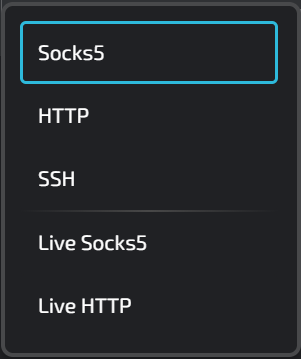
proxy protocols available in linken sphere

The types of proxies that can be used in Linken Sphere include:


Socks5: This type of proxy is very versatile and is often used in Linken Sphere for activities that require robust security and anonymity, such as managing multiple accounts on different platforms. It supports both TCP and UDP protocols, making it ideal for applications beyond simple web browsing.  Learn more about Socks5 proxy.


HTTP: Suitable for regular web browsing within Linden Sphere, HTTP proxies can interpret and manage web traffic. This is useful for tasks such as web scraping or accessing geo-restricted content, as they can filter and cache data to improve load times and efficiency. Learn more about HTTP proxy.


SSH: While not typically used directly through browsers like Linken Sphere, SSH proxies can secure data transfer channels between the browser and remote servers. This can be particularly useful for securely accessing server resources or managing websites over an encrypted connection, increasing security when performing sensitive tasks. Learn more about SSH protocol.


Live Socks5 / Live HTTP: These are built-in free public proxies that have been pre-tested and are available to the users of the LS browser. Learn more about public proxies.


In our guide, we will be using Socks5 proxies as the most anonymous type of proxy. We will use data center hosted IPs. Overall, the LS browser allows the use of any other types of proxies, whether they are mobile or residential.


Below, we will explore the addition of different types of proxies required for various browser usage scenarios:


- Setting up a static proxy;

- Setting up a rotating proxy;

- Bulk uploading proxies using a list.

Step 1: Open the Proxy Manager in the Linken Sphere Browser


Adding proxy servers in this browser can be done in two ways. The first method is to create a new session and then add a proxy to the existing session. The second method is to add a proxy server to the browser's proxy manager and then assign it to future sessions.


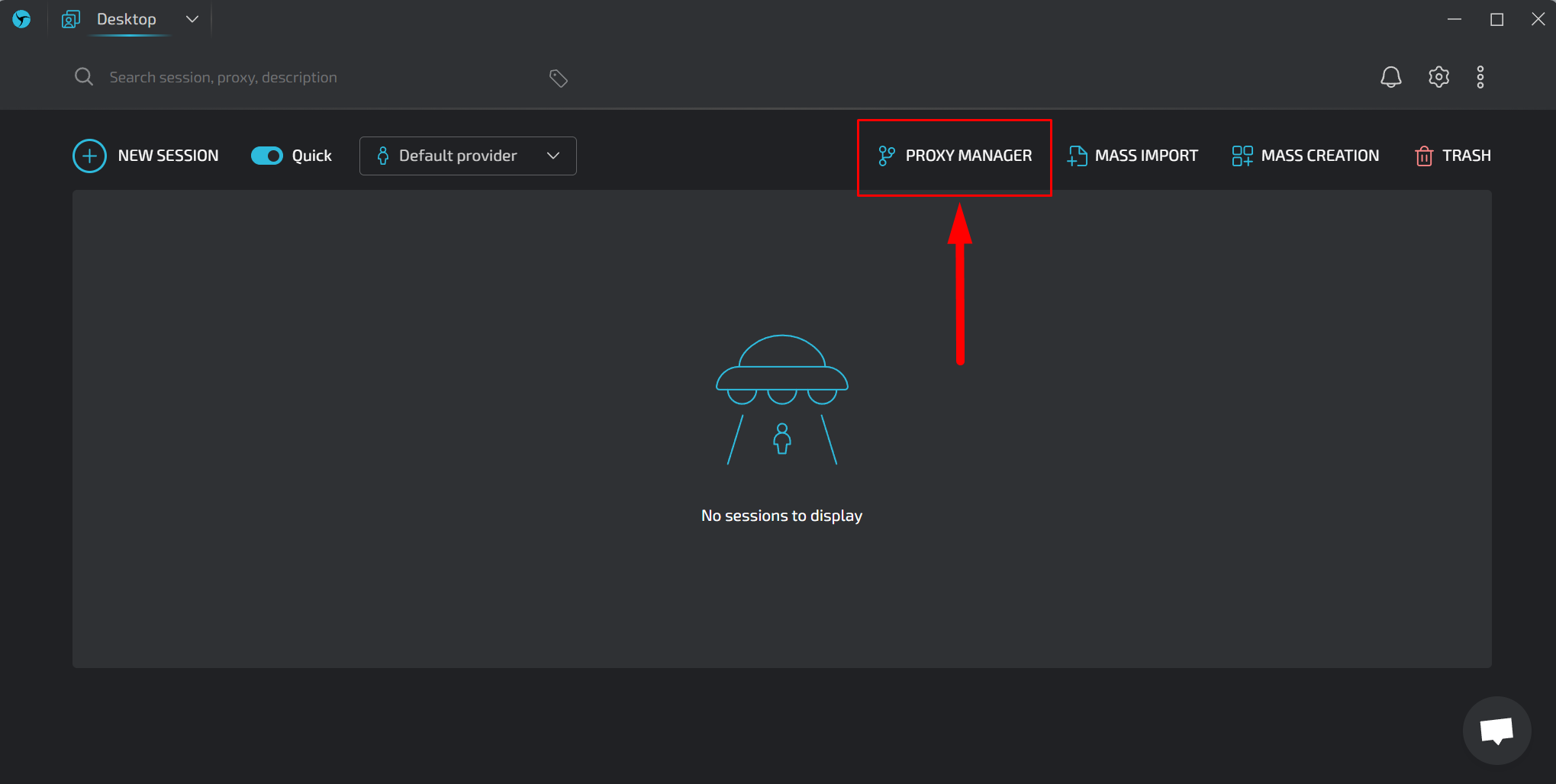
To access the Proxy Manager in the browser, click on its label at the top of the program.


linken sphere open proxy manager

Scenario 1: Adding a Static Proxy


Static proxies in the Linken Sphere browser are critical for certain tasks because they provide a consistent IP address that does not change with each request. This stability is essential for operations that require a high level of trust from websites, such as managing long-term social media campaigns or online banking, where IP consistency helps avoid triggering security alerts and ensures a smoother experience.


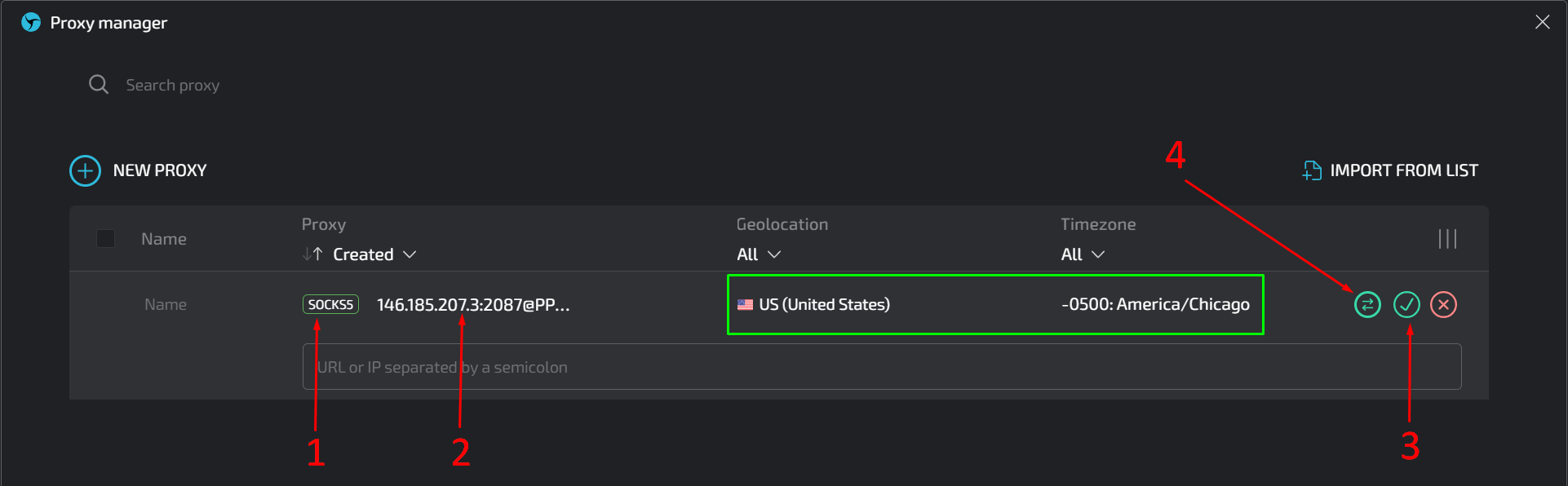
To add a proxy, prepare it in one of the following formats:


ip:port for proxies authenticated by IP
ip:port@login:pass for proxies authenticated by username and password


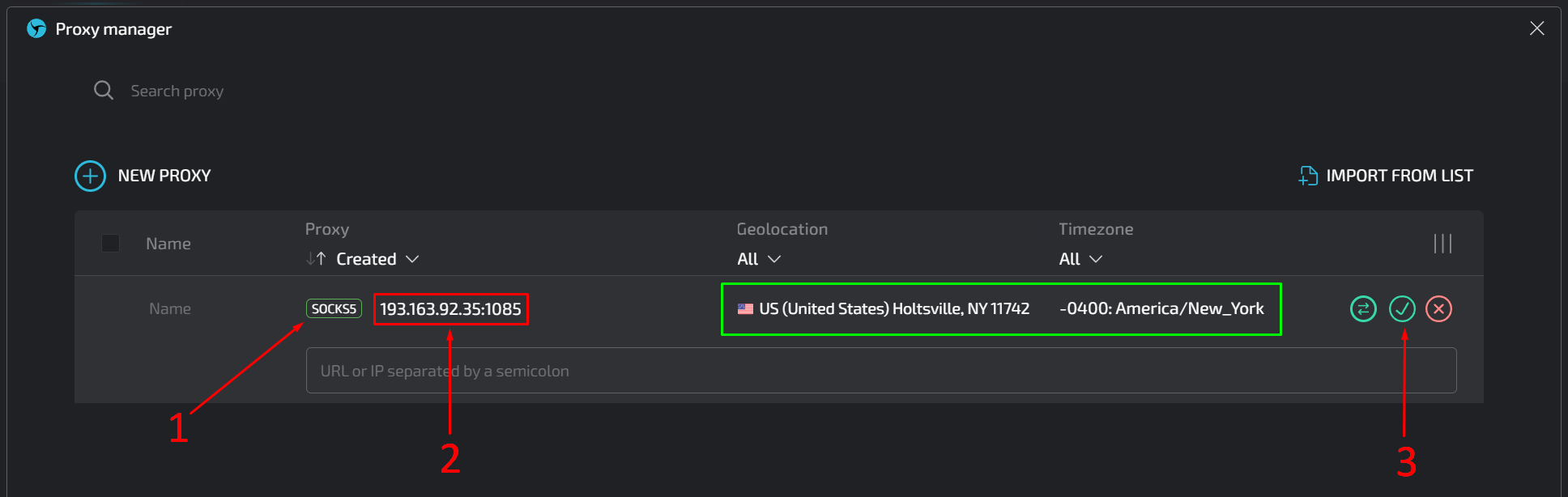
- Select the required proxy protocol by clicking on the label as shown in the screenshot.
In our case, it's SOCKS5.

- Copy and paste the IP address, port, and, if necessary, login and password for the proxy into the next field.

The Linken Sphere browser will automatically check the availability, geolocation, and time zone of the specified proxy (highlighted with a green frame in the screenshot).


- Click on the checkmark to save the data.

You can then assign this proxy to a specific session.


adding a static socks5 proxy to linken sphere

Scenario 2: Adding a Rotating Proxy


In the Linken Sphere browser, a rotating proxy may be necessary for tasks that require frequent IP changes to avoid detection and blocking, such as web scraping or managing multiple accounts. This scenario may occur less frequently than using a static proxy, but it is critical for activities where an IP address cannot be consistently associated with a user's behavior.


Adding a rotating proxy is similar to adding a static proxy, with the main difference being that instead of entering a proxy IP address, you must enter the gateway for rotating proxies. This gateway will provide random IP addresses for each new action in the browser (clicking a link, refreshing the page, etc.).


Here are the steps to follow:


- Select the needed proxy protocol by clicking on the protocol label as shown in the screenshot.

- Copy and paste the IP gateway, port, and, if necessary, login and password.

- Click on the checkmark to save the data.

- Click on the icon with bidirectional arrows several times to ensure that the gateway is functioning, providing a new random IP with each click.

adding a rotating socks5 proxy to linken sphere

When you click on the icon with bidirectional arrows symbol button recheck proxy connection linken sphere several times, you should see a display similar to the one in the screenshot below:
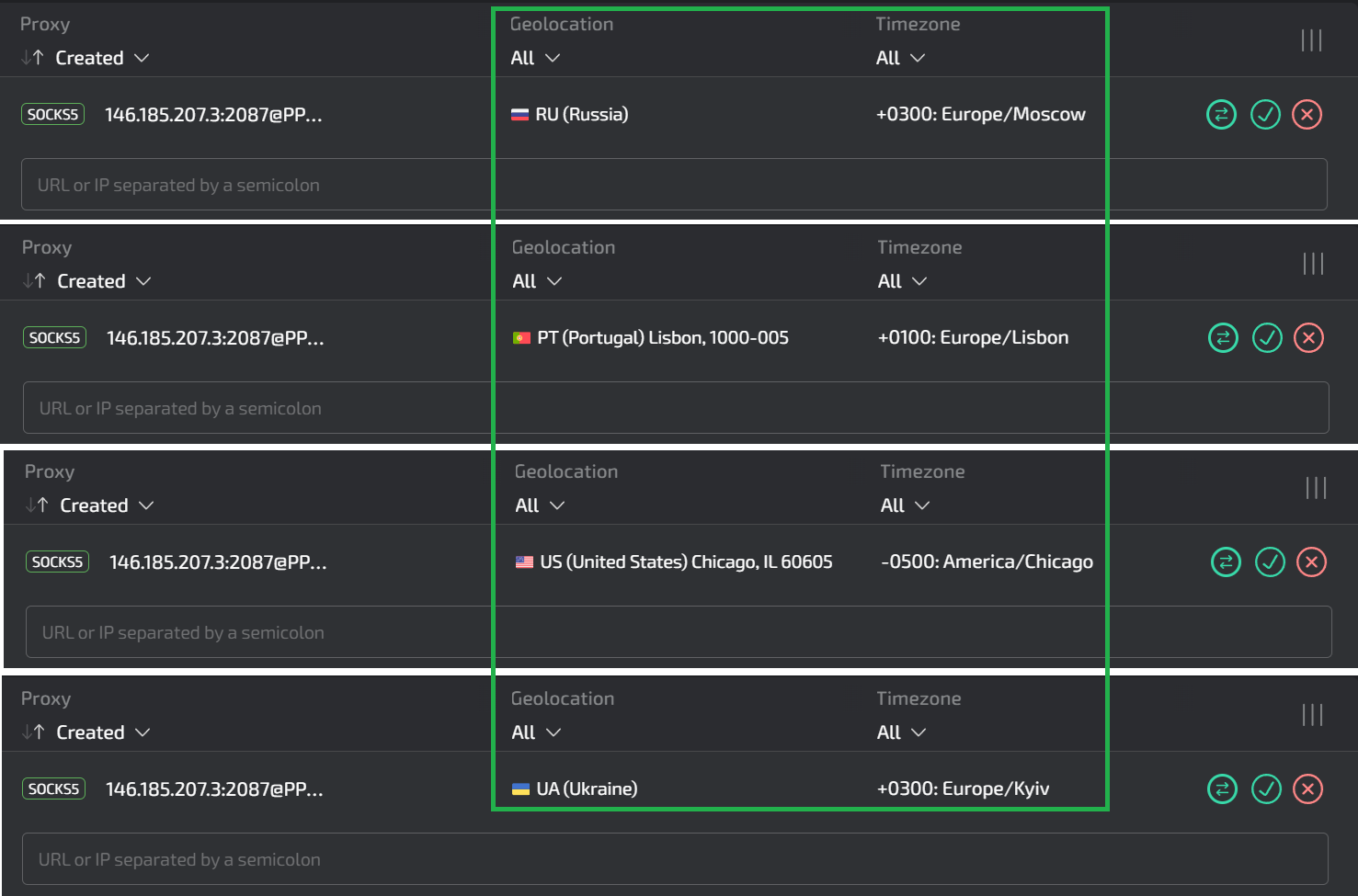


checking the rotating socks5 proxy gateway in linken sphere

Great! The rotating proxy is ready to use and can be associated with a specific session in the Linken Sphere browser.


Szenario 3: Adding Proxies in Bulk


Adding proxies in bulk via a list in the Linken Sphere browser is ideal for users managing large-scale operations such as social media management across multiple geographic locations. 


This feature simplifies the integration and management of multiple proxies, allowing for quick setup and ensuring that backup options are available for redundancy. It is particularly useful for tasks that require a diverse set of IP addresses to mimic local behavior or efficiently test regional settings.
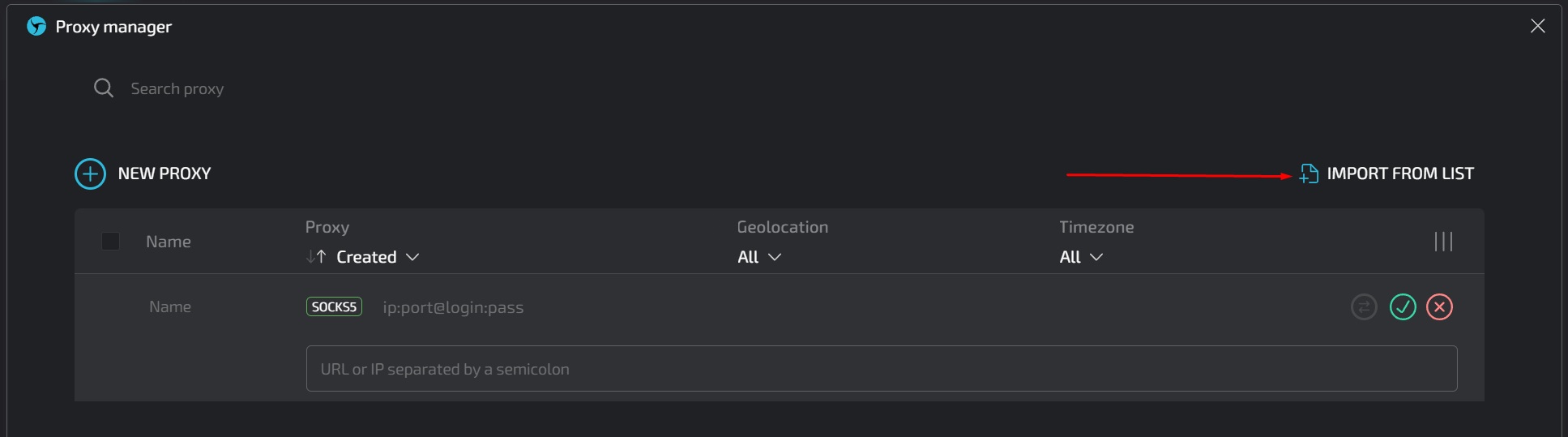
To add your list to the browser, click on the “IMPORT FROM LIST” button in the Proxy Manager.


import proxies in bulk in linken sphere

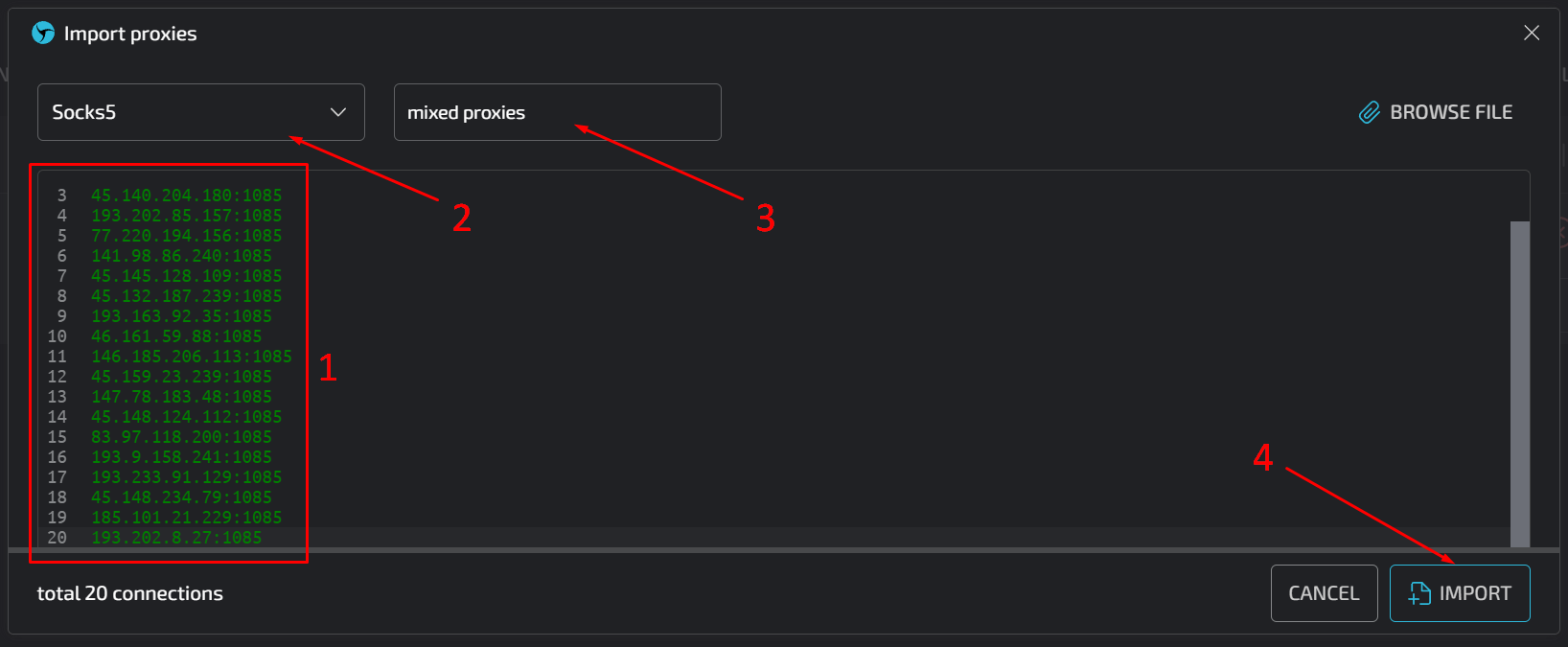
You can upload a text file with proxy data or do the following


- Copy and paste the proxy list into the appropriate field.

- Select the proxy protocol.

- Give the list an appropriate title. The Linken Sphere browser will add indexes to this name so that each proxy in the list has its own unique title.

Click the "IMPORT" button.


paste the proxy list in linken sphere

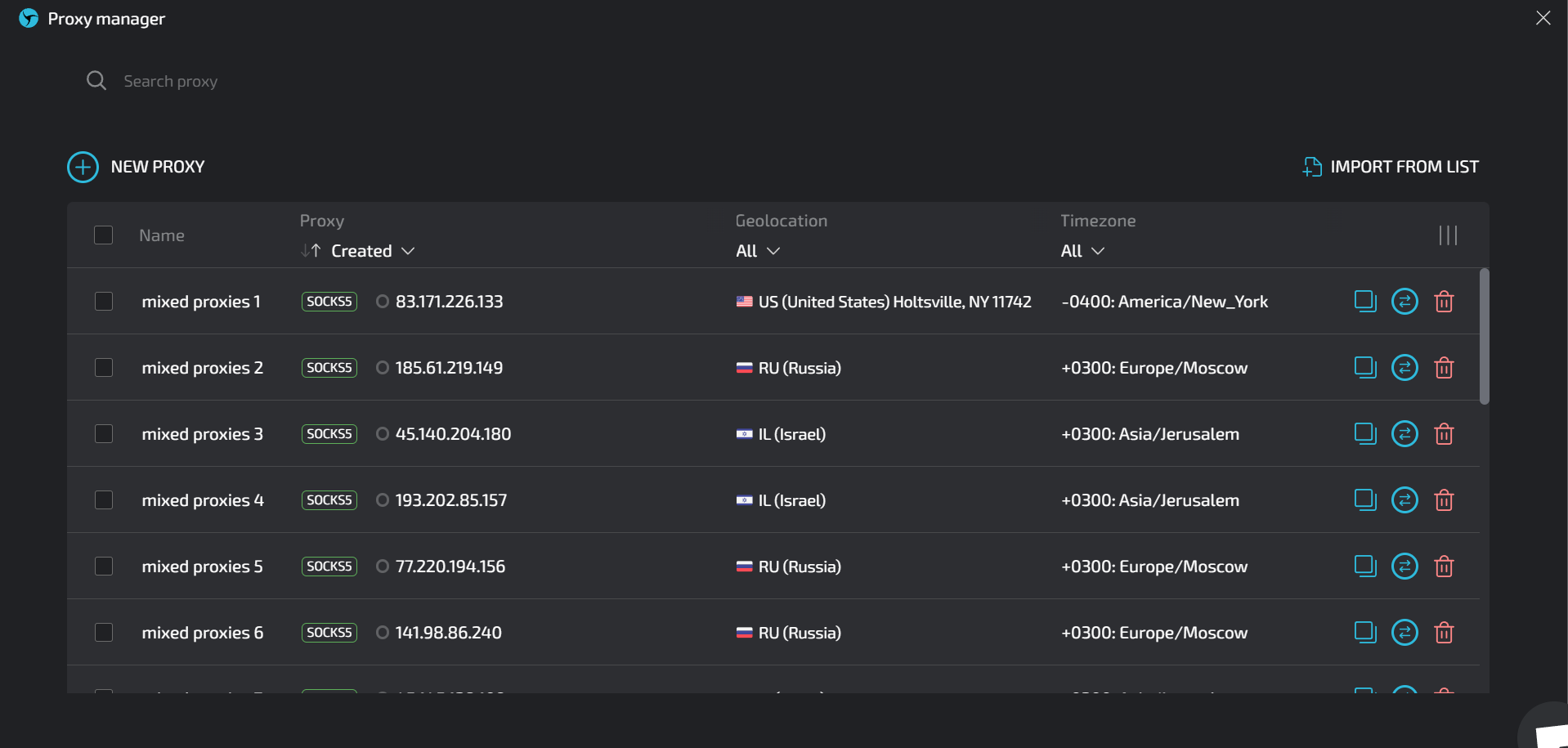
After completing these steps, a window will appear as shown in the screenshot below.


bulk proxy results in linken sphere

The Link Sphere browser will automatically check the connection to each proxy in the list and determine its geographic location and time zone. Now you can assign these proxies to the sessions required for specific tasks.


The Linken Sphere browser is now fully ready for use!


https://proxycompass.com/knowledge-base/setting-up-proxies-in-linken-sphere/

Dienstag, 2. Juli 2024

How To Set Up Proxies in Cốc Cốc

How To Set Up Proxies in Cốc Cốc

What is the Cốc Cốc Browser?


Cốc Cốc Browser is a popular web browser in Vietnam, designed specifically to meet the needs of Vietnamese users. It offers improved support for the Vietnamese language, including automatic typo correction and keyword suggestions optimized for Vietnamese. The browser is known for its fast download speeds and features such as a built-in ad blocker, video downloader, and advanced privacy settings. Cốc Cốc also integrates well with social media and provides local weather updates directly in the browser interface.


Why Use Proxies in Cốc Cốc Browser?


Using proxies in Cốc Cốc Browser is especially beneficial for users in Vietnam, a country with a very active online community. Many Vietnamese people work remotely and engage in various online activities, making proxies essential for enhancing privacy, bypassing geo-restrictions, and improving security. Proxies allow users to access a wider range of content, optimize connection speeds, and maintain online anonymity, which is critical for remote workers and those engaged in sensitive activities.


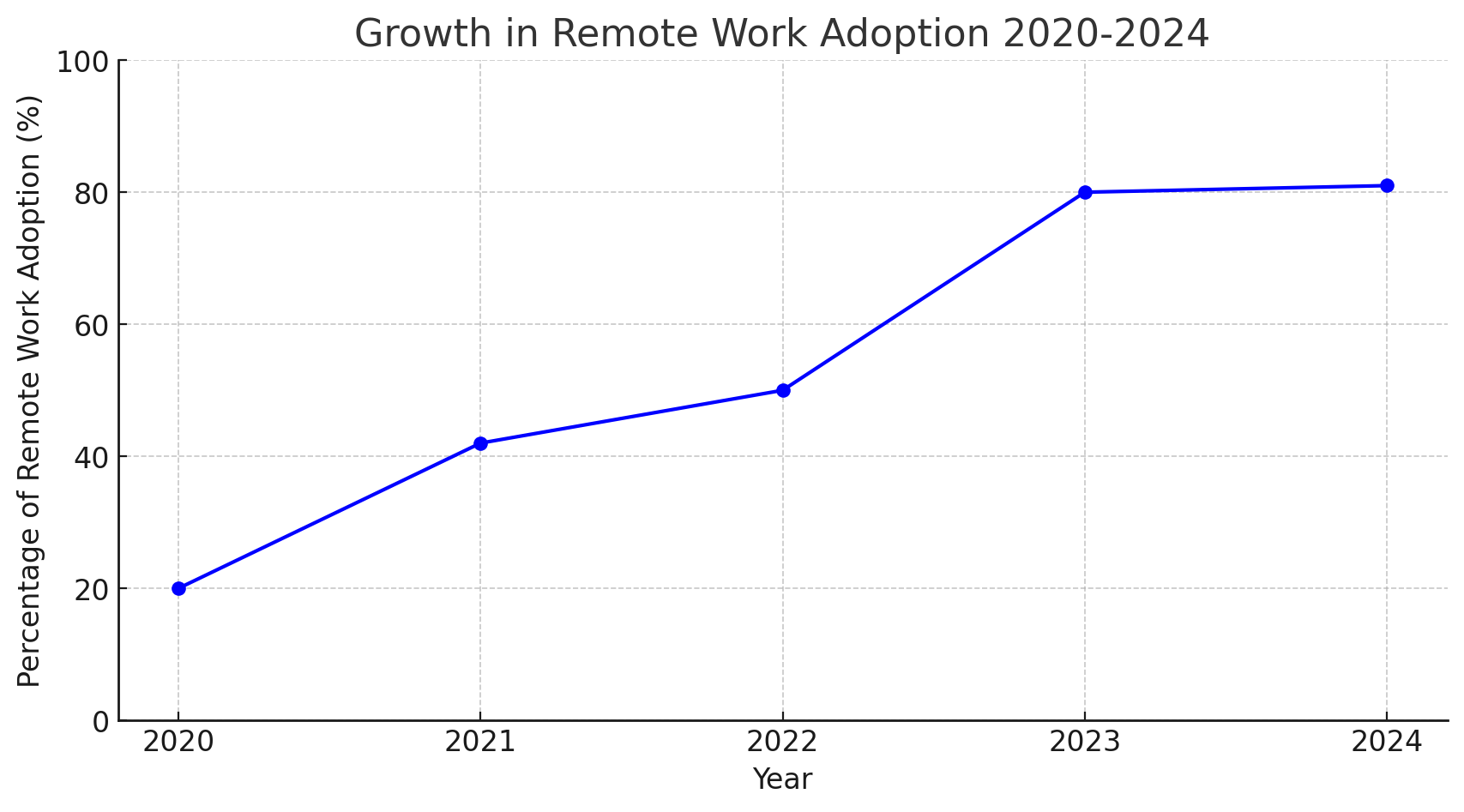
Line graph showing the growth in remote work adoption from 2020 to 2024. The trend begins at 20% in 2020, rising to 42% in 2021, 50% in 2022, peaking at 80% in 2023, and leveling off to 81% in 2024. The graph illustrates a steady increase in remote work practices, highlighting a significant and lasting shift in work habits towards more flexible working environments.

According to the Vietnam Digital Readiness report, 82% of survey participants expect work-from-home practices to increase even after COVID-19, indicating a shift towards a more hybrid work environment. As employees adapt to this lifestyle, organizations need to redefine workplace norms to better accommodate this trend.


Vietnam ranks 59th on the 2023 Global Remote Work Index, assessing 108 countries on their suitability for telecommuting, based on internet quality, digital infrastructure, and governmental digital initiatives.


The remote IT job market in Vietnam has experienced significant growth, with a 50% increase in listings on major platforms like VietnamWorks and TopDev over the past year, covering roles from software development to IT project management.


Remote work adoption has risen sharply from 20% in 2020 to an expected 81% by 2024, demonstrating a lasting shift towards flexible working arrangements post-pandemic.


Setting Up Proxies in the Cốc Cốc Browser


The Cốc Cốc browser is developed using the Chromium open source project. This means that its core settings, including proxy configurations, are similar to those in other browsers built on the same platform. Examples of such browsers include Google Chrome, Microsoft Edge, Opera, and Brave. These browsers share a common foundation, allowing for a consistent approach in managing settings like proxies.


Due to its reliance on the Chromium architecture, the Cốc Cốc browser lacks advanced proxy settings out of the box. It does not fully support proxy authentication via username and password, nor does it provide full support for the SOCKS protocol. This is a significant limitation as the SOCKS protocol is considered to be the most anonymous and versatile. As a result, users are forced to use proxies that support HTTP and HTTPS protocols, which may not provide the same level of anonymity as SOCKS.


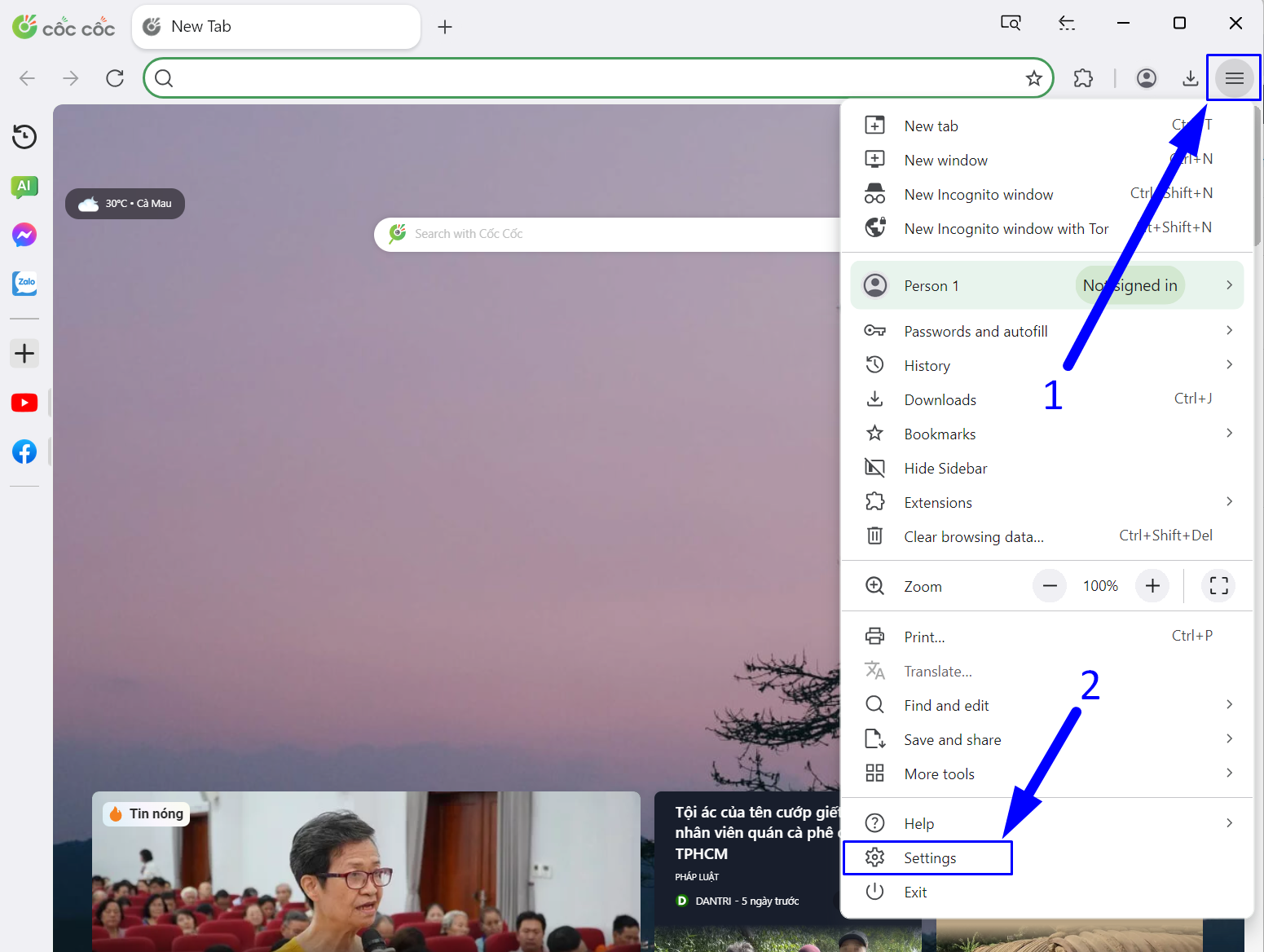
Step 1: Open the Browser Settings

- Click on the three horizontal lines (hamburger icon) in the top right corner of the browser window.

- In the menu that appears, click on "Settings".

open browser settings

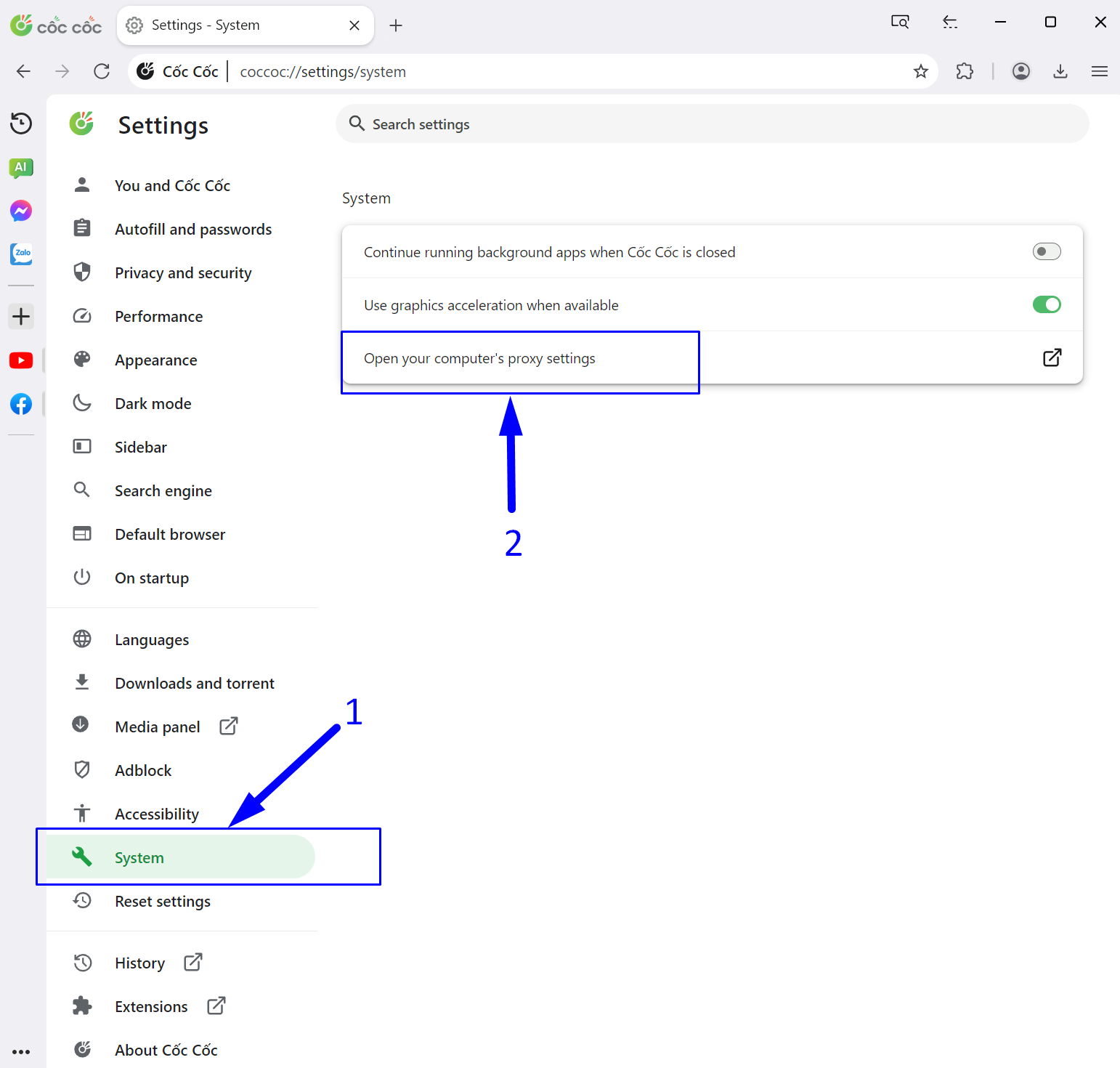
Step 2: Open the System Proxy Settings

- In the left column of the menu that appears, select "System".

- In the "System" menu section, click on "Open your computer's proxy settings".

open proxy settings

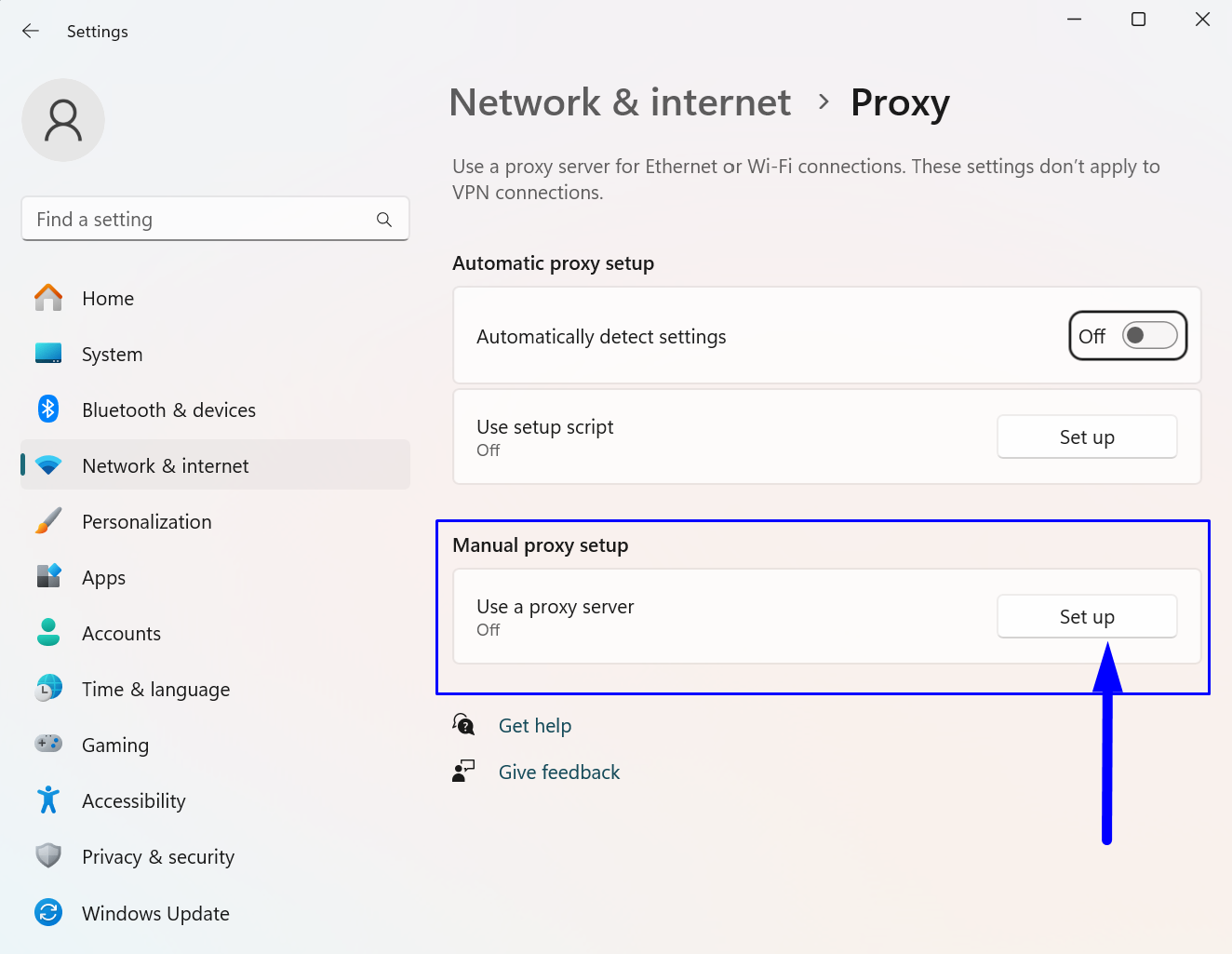
Step 3: Enter the Network Settings

In the "Proxy" section of the menu, under "Manual proxy setup", click on the "Set up" button.


enter the network settings

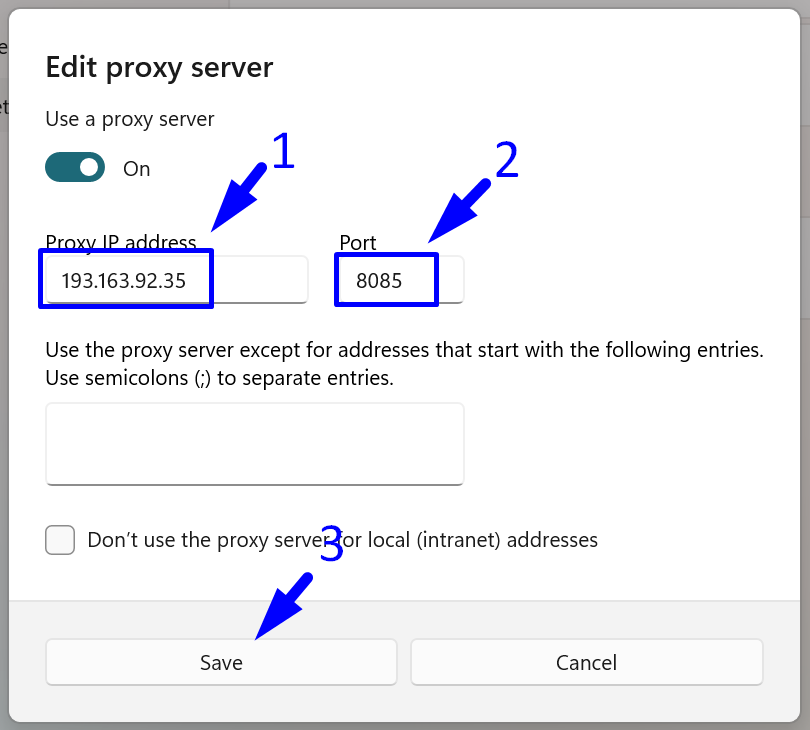
Step 4: Enter the Proxy Server Details

- Enter the IP address of your HTTP or HTTPS proxy.

- Enter the proxy port.

- Save the settings by clicking the "Save" button.

Enter the Proxy Server Details

From this point, all your actions in the Cốc Cốc browser will be carried out through the specified proxy.


To see how this works in practice, you can purchase a premium proxy or try a free Vietnamese proxy.


https://proxycompass.com/knowledge-base/how-to-set-up-proxies-in-coc-coc/

Montag, 1. Juli 2024

Setting Up a Proxy in MuLogin

Setting Up a Proxy in MuLogin

MuLogin is a multi-accounting browser preferred by IT professionals and business users to efficiently manage various web services and social networks. It features robust anti-detection software that enhances user anonymity and security by evading online tracking systems.


Key features include:


- Simultaneous operation of multiple windows or tabs, each with unique profiles and accounts.

- Cookie and data storage isolation per tab or window, preventing cross-account data leakage.

- Synchronize bookmarks, passwords, and other data across profiles or devices.

- Customize UserAgent settings, including device characteristics, OS type, screen resolution, and more.

- Tools to mask the real IP address and route traffic through proxies or VPNs to maintain privacy.

- Ability to change browser fingerprints, such as time zone and language settings.

This browser is ideal for anyone seeking online privacy, including marketers, web testers, and analysts. The guide details how to configure a proxy server in MuLogin for enhanced security.


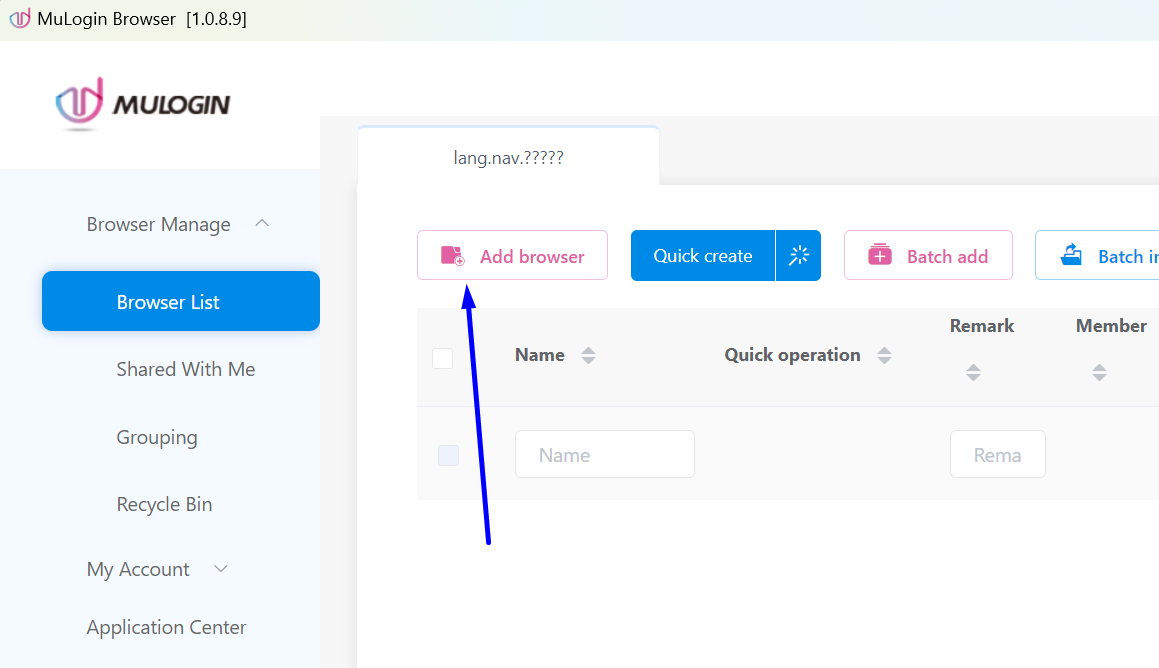
Step 1: Adding a New Browser in MuLogin


To begin working with MuLogin, first click on the "Add browser" button as shown in the screenshot below.


Adding a New Browser in MuLogin

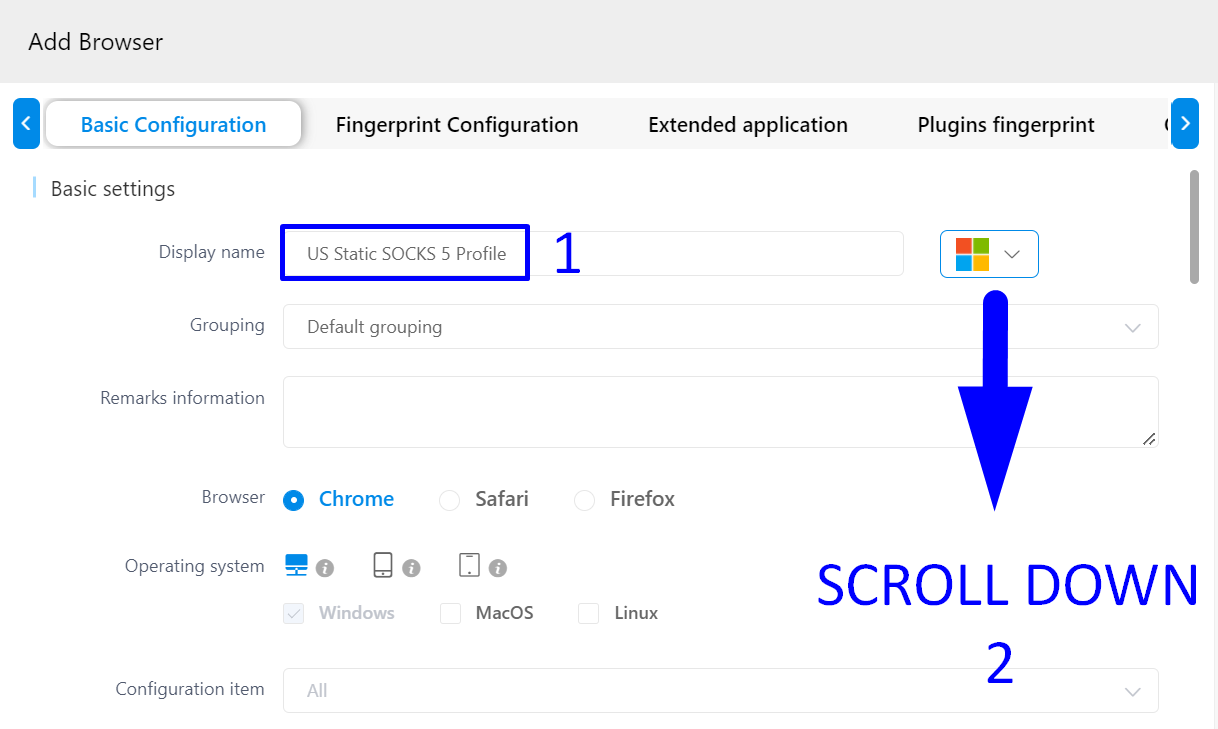
Step 2: Enter the Browser Name


Next:


- In the "Display name" field, enter the name of the browser profile.

- Scroll down to the "Proxy Settings" section.

MuLogin Enter the Browser Name

Step 3: Enter Proxy Server Details


Follow these steps to enter your proxy information:


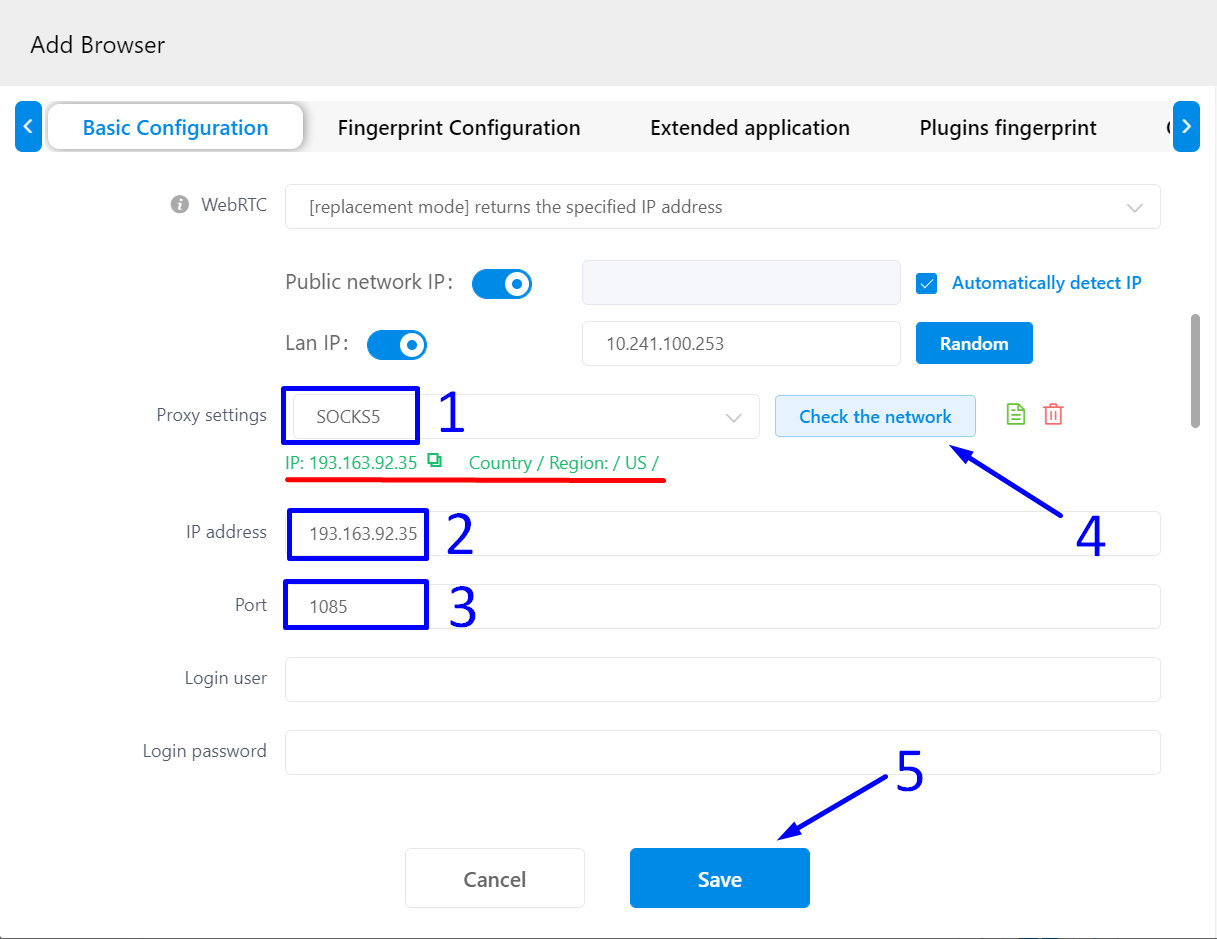
1. In the "Proxy settings" dropdown menu, select the appropriate protocol. In our case, choose SOCKS5 for its superior anonymity and reliability.


2. Enter the IP address of your proxy.


3. Enter the port number.


4. Click the "Check the network" button to test the connection to your proxy.


If the connection is successful, a green label with your proxy's geolocation will appear, highlighted in red in our screenshot.


5. Save the settings by clicking the "Save" button.


MuLogin Enter Proxy Server Details

MuLogin browser is now ready for use. Each of your actions on the internet will be carried out through the proxy you specified.


https://proxycompass.com/knowledge-base/setting-up-a-proxy-in-mulogin/